Problems accessing site on Ubuntu Server

I am back! :smiley:

I have decided that I would try setting up InvoiceNinja on a VPS that I have instead of trying to run it on my QNAP. This way I can utilize things like the client portals, etc. more easily.

I followed the instructions given here:

However, I cannot get InvoiceNinja to load. I get a 500 error. The very first time, I got the default nginx website, but not any longer. Just the 500 error.

Here is my nginx site file:

server {
# NOTE That the 'default_server' option is only necessary if this is your primary domain application.
# If you run multiple subdomains from the same host already, remove the 'default_server' option.
   listen       443 ssl http2 default_server;
   listen       [::]:443 ssl http2 default_server;
   server_name  billing.justaddsoftware.net;
   client_max_body_size 20M;

 # This if statement will forcefully redirect any connection attempts to explicitly use the domain name.  
 # If not, and your DNS doesn't provide IP address protection, accessing the server with direct IP can
 # cause glitches with the services provided by the app, that could be security, or usability issues.

   if ($host != $server_name) {
     return 301 https://$server_name$request_uri;
   }

 # Here, enter the path to your invoiceninja directory, in the public dir.  VERY IMPORTANT
 # DO NOT point the root directly at your invoiceninja directory, it MUST point at the public folder
 # This is for security reasons.

   root         /usr/share/nginx/invoiceninja/public;

   gzip on;
   gzip_types application/javascript application/x-javascript text/javascript text/plain application/xml application/json;
   gzip_proxied    no-cache no-store private expired auth;
   gzip_min_length 1000;

   index index.php index.html index.htm;

 # Enter the path to your existing ssl certificate file, and certificate private key file
 # If you don’t have one yet, you can configure one with openssl in the next step.
ssl_certificate "/etc/letsencrypt/live/billing.justaddsoftware.net/fullchain.pem";
	ssl_certificate_key "/etc/letsencrypt/live/billing.justaddsoftware.net/privkey.pem";

   ssl_session_cache shared:SSL:1m;
   ssl_session_timeout  10m;
   ssl_ciphers 'AES128+EECDH:AES128+EDH:!aNULL';
   ssl_prefer_server_ciphers on;
   ssl_protocols TLSv1 TLSv1.1 TLSv1.2;

   charset utf-8;

 # Load configuration files for the default server block.
   include /etc/nginx/default.d/*.conf;

   location / {
       try_files $uri $uri/ /index.php?$query_string;
   }

   if (!-e $request_filename) {
           rewrite ^(.+)$ /index.php?q= last;
   }

   location ~ \.php$ {
           fastcgi_split_path_info ^(.+\.php)(/.+)$;
      # Here we pass php requests to the php8.3-fpm listen socket.  
      # PHP errors are often because this value is not correct.  
      # Verify your php8.3-fpm.sock socket file exists at the below directory
      # and that the php8.3-fpm service is running.
           fastcgi_pass unix:/run/php/php8.3-fpm.sock;
           fastcgi_index index.php;
           include fastcgi_params;
           fastcgi_param SCRIPT_FILENAME $document_root$fastcgi_script_name;
           fastcgi_intercept_errors off;
           fastcgi_buffer_size 16k;
           fastcgi_buffers 4 16k;
   }

   location ~ /\.ht {
       deny all;
   }

   location = /favicon.ico { access_log off; log_not_found off; }
   location = /robots.txt { access_log off; log_not_found off; }

   access_log /var/log/nginx/ininja.access.log;
   error_log /var/log/nginx/ininja.error.log;

   sendfile off;

  }

  server {
      listen      80;
      server_name billing.justaddsoftware.net;
      add_header Strict-Transport-Security max-age=2592000;
      rewrite ^ https://$server_name$request_uri? permanent;
  }

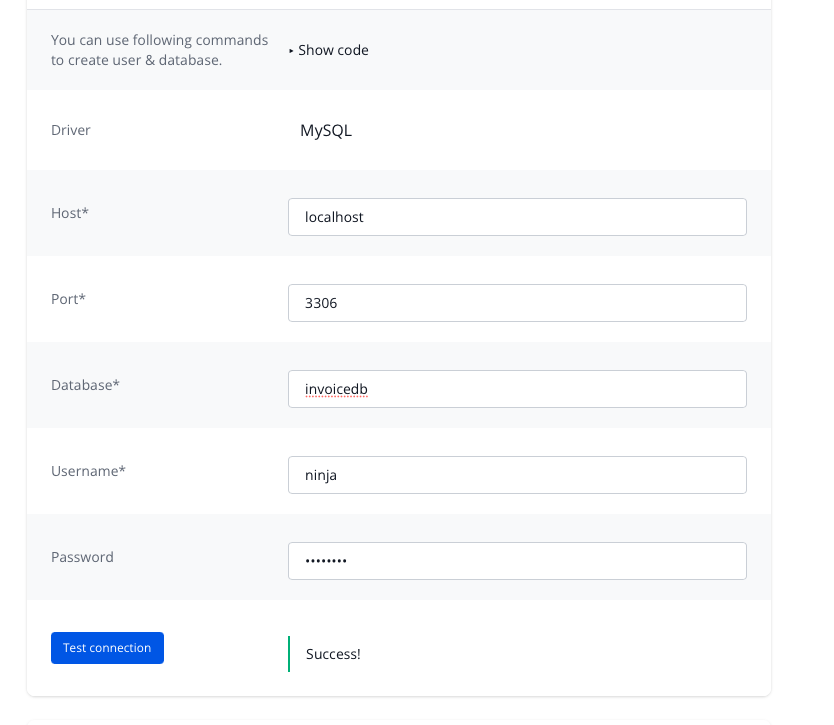
And my .env file. This one is where I get confused a bit. Do I need to use LOCALHOST here or my site name?

APP_NAME="InvoiceNinja"
APP_ENV=production
APP_KEY=base64:RR++y
APP_DEBUG=false

APP_URL=http://localhost
REACT_URL=https://localhost:3001

DB_CONNECTION=mysql
MULTI_DB_ENABLED=false

DB_HOST=localhost
DB_DATABASE=invoicedb
DB_USERNAME=ninja
DB_PASSWORD=***********
DB_PORT=3306

DEMO_MODE=false

BROADCAST_DRIVER=log
LOG_CHANNEL=stack
CACHE_DRIVER=file
QUEUE_CONNECTION=sync
SESSION_DRIVER=file
SESSION_LIFETIME=120

MAIL_MAILER=smtp
REDIS_HOST=127.0.0.1
REDIS_PASSWORD=null
REDIS_PORT=6379

POSTMARK_API_TOKEN=
REQUIRE_HTTPS=false

GOOGLE_MAPS_API_KEY=
ERROR_EMAIL=
TRUSTED_PROXIES=
SCOUT_DRIVER=null 

NINJA_ENVIRONMENT=selfhost

#options - snappdf / phantom / hosted_ninja
PDF_GENERATOR=hosted_ninja

PHANTOMJS_KEY='a-demo-key-with-low-quota-per-ip-address'
PHANTOMJS_SECRET=secret

UPDATE_SECRET=secret

DELETE_PDF_DAYS=60
DELETE_BACKUP_DAYS=60

COMPOSER_AUTH='{"github-oauth": {"github.com": "${{ secrets.GITHUB_TOKEN }}"}}'

GOOGLE_PLAY_PACKAGE_NAME=
APPSTORE_PASSWORD=

MICROSOFT_CLIENT_ID=
MICROSOFT_CLIENT_SECRET=
MICROSOFT_REDIRECT_URI=

APPLE_CLIENT_ID=
APPLE_CLIENT_SECRET=
APPLE_REDIRECT_URI=

NORDIGEN_SECRET_ID=
NORDIGEN_SECRET_KEY=

GOCARDLESS_CLIENT_ID=
GOCARDLESS_CLIENT_SECRET=


When I run nginx -tit says successful. I get the invoiceninja icon in the browser as well:
image

So where am I going wrong? I was hoping I would FINALLY have success here…
Hi,

There should be details about the 500 error in either storage/logs or the web server error logs.

Nothing in storage/logs. Webserver logs, a different story:

2026/04/19 00:03:03 [error] 13204#13204: *1 FastCGI sent in stderr: "PHP message: PHP Warning:  require(/usr/share/nginx/invoiceninja/public/../vendor/autoload.php): Failed to open stream: No such file or directory in /usr/share/nginx/invoiceninja/public/index.php on line 26; PHP message: PHP Fatal error:  Uncaught Error: Failed opening required '/usr/share/nginx/invoiceninja/public/../vendor/autoload.php' (include_path='.:/usr/share/php') in /usr/share/nginx/invoiceninja/public/index.php:26
Stack trace:
#0 {main}
  thrown in /usr/share/nginx/invoiceninja/public/index.php on line 26" while reading response header from upstream, client:xx.xx.xx.xx, server: billing.justaddsoftware.net, request: "GET /setup HTTP/2.0", upstream: "fastcgi://unix:/run/php/php8.3-fpm.sock:", host: "billing.justaddsoftware.net"
2026/04/19 00:03:09 [error] 13204#13204: *1 FastCGI sent in stderr: "PHP message: PHP Warning:  require(/usr/share/nginx/invoiceninja/public/../vendor/autoload.php): Failed to open stream: No such file or directory in /usr/share/nginx/invoiceninja/public/index.php on line 26; PHP message: PHP Fatal error:  Uncaught Error: Failed opening required '/usr/share/nginx/invoiceninja/public/../vendor/autoload.php' (include_path='.:/usr/share/php') in /usr/share/nginx/invoiceninja/public/index.php:26
Stack trace:
#0 {main}
  thrown in /usr/share/nginx/invoiceninja/public/index.php on line 26" while reading response header from upstream, client: xx.xx.xx.xx, server: billing.justaddsoftware.net, request: "GET /setup HTTP/2.0", upstream: "fastcgi://unix:/run/php/php8.3-fpm.sock:", host: "billing.justaddsoftware.net"
2026/04/19 00:03:15 [error] 13204#13204: *1 FastCGI sent in stderr: "PHP message: PHP Warning:  require(/usr/share/nginx/invoiceninja/public/../vendor/autoload.php): Failed to open stream: No such file or directory in /usr/share/nginx/invoiceninja/public/index.php on line 26; PHP message: PHP Fatal error:  Uncaught Error: Failed opening required '/usr/share/nginx/invoiceninja/public/../vendor/autoload.php' (include_path='.:/usr/share/php') in /usr/share/nginx/invoiceninja/public/index.php:26
Stack trace:

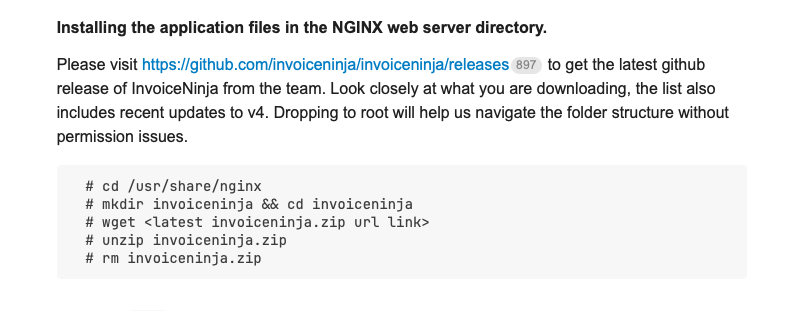
I just checked the zip file I downloaded from:

https://github.com/invoiceninja/invoiceninja/archive/refs/tags/v5.13.19.zip

There is no file named autoload.php in

public/vendor

Is it possible that file was left out of the build?

This file is also non-existent in the build at:

https://github.com/invoiceninja/invoiceninja/archive/refs/tags/v5.13.18.zip

You need to use the release tar’s.

Then the instructions in the link posted on the InvoiceNinja.org website are wrong:

Why would the tarball have the file but the zip not? That doesn’t make sense.

Uh, yeah. The file is missing from the tarball as well. Not there.

Oh wait - I just downloaded the invoiceninja.tar and it has a lot more there. OK. Not sure why you guys have file missing from some of your files. There is a LOT missing in the source code zips and tarballs.

Things change over time, I’ve asked the author of the guide to update it.

Thank you.

I am much closer but still getting this in the error log now. Looks like a permissions problem.

2026/04/19 05:43:38 [error] 2889#2889: *1 FastCGI sent in stderr: "PHP message: PHP Fatal error:  Uncaught UnexpectedValueException: The stream or file "/usr/share/nginx/invoiceninja/storage/logs/laravel.log" could not be opened in append mode: Failed to open stream: Permission denied
The exception occurred while attempting to log: tempnam(): file created in the system's temporary directory
Context: {"exception":{}} in /usr/share/nginx/invoiceninja/vendor/monolog/monolog/src/Monolog/Handler/StreamHandler.php:164
Stack trace:
#0 /usr/share/nginx/invoiceninja/vendor/monolog/monolog/src/Monolog/Handler/AbstractProcessingHandler.php(44): Monolog\Handler\StreamHandler->write()
#1 /usr/share/nginx/invoiceninja/vendor/monolog/monolog/src/Monolog/Logger.php(391): Monolog\Handler\AbstractProcessingHandler->handle()
#2 /usr/share/nginx/invoiceninja/vendor/monolog/monolog/src/Monolog/Logger.php(646): Monolog\Logger->addRecord()
#3 /usr/share/nginx/invoiceninja/vendor/laravel/framework/src/Illuminate/Log/Logger.php(187): Monolog\Logger->error()
#4 /usr/share/nginx/invoicenin...; PHP message: PHP Fatal error:  Uncaught UnexpectedValueException: The stream or file "/usr/share/nginx/invoiceninja/storage/logs/laravel.log" could not be opened in append mode: Failed to open stream: Permission denied
The exception occurred while attempting to log: tempnam(): file created in the system's temporary directory
Context: {"exception":{}} in /usr/share/nginx/invoiceninja/vendor/monolog/monolog/src/Monolog/Handler/StreamHandler.php:164
Stack trace:
#0 /usr/share/nginx/invoiceninja/vendor/monolog/monolog/src/Monolog/Handler/AbstractProcessingHandler.php(44): Monolog\Handler\StreamHandler->write()
#1 /usr/share/nginx/invoiceninja/vendor/monolog/monolog/src/Monolog/Logger.php(391): Monolog\Handler\AbstractProcessingHandler->handle()
#2 /usr/share/nginx/invoiceninja/vendor/monolog/monolog/src/Monolog/Logger.php(646): Monolog\Logger->addRecord()
#3 /usr/share/nginx/invoiceninja/vendor/laravel/framework/src/Illuminate/Log/Logger.php(187): Monol

Agreed, seems likely related to permissions.

Here are the relevant docs:

Well, I followed all that - still not working.

2026/04/19 05:43:38 [error] 2889#2889: *1 FastCGI sent in stderr: "PHP message: PHP Fatal error:  Uncaught UnexpectedValueException: The stream or file "/usr/share/nginx/invoiceninja/storage/logs/laravel.log" could not be opened in append mode: Failed to open stream: Permission denied
The exception occurred while attempting to log: tempnam(): file created in the system's temporary directory
Context: {"exception":{}} in /usr/share/nginx/invoiceninja/vendor/monolog/monolog/src/Monolog/Handler/StreamHandler.php:164
Stack trace:
#0 /usr/share/nginx/invoiceninja/vendor/monolog/monolog/src/Monolog/Handler/AbstractProcessingHandler.php(44): Monolog\Handler\StreamHandler->write()
#1 /usr/share/nginx/invoiceninja/vendor/monolog/monolog/src/Monolog/Logger.php(391): Monolog\Handler\AbstractProcessingHandler->handle()
#2 /usr/share/nginx/invoiceninja/vendor/monolog/monolog/src/Monolog/Logger.php(646): Monolog\Logger->addRecord()
#3 /usr/share/nginx/invoiceninja/vendor/laravel/framework/src/Illuminate/Log/Logger.php(187): Monolog\Logger->error()
#4 /usr/share/nginx/invoicenin...; PHP message: PHP Fatal error:  Uncaught UnexpectedValueException: The stream or file "/usr/share/nginx/invoiceninja/storage/logs/laravel.log" could not be opened in append mode: Failed to open stream: Permission denied
The exception occurred while attempting to log: tempnam(): file created in the system's temporary directory
Context: {"exception":{}} in /usr/share/nginx/invoiceninja/vendor/monolog/monolog/src/Monolog/Handler/StreamHandler.php:164
Stack trace:
#0 /usr/share/nginx/invoiceninja/vendor/monolog/monolog/src/Monolog/Handler/AbstractProcessingHandler.php(44): Monolog\Handler\StreamHandler->write()
#1 /usr/share/nginx/invoiceninja/vendor/monolog/monolog/src/Monolog/Logger.php(391): Monolog\Handler\AbstractProcessingHandler->handle()
#2 /usr/share/nginx/invoiceninja/vendor/monolog/monolog/src/Monolog/Logger.php(646): Monolog\Logger->addRecord()
#3 /usr/share/nginx/invoiceninja/vendor/laravel/framework/src/Illuminate/Log/Logger.php(187): Monol

And the permissions for laravel.log are all full r/w. So what gives?

root@Auto-Install-Ubuntu-Server-22:/usr/share/nginx/invoiceninja/storage/logs# ls -la laravel.log
-rwxrwxrwx 1 www-data www-data 2997055 Apr 19 13:35 laravel.log
root@Auto-Install-Ubuntu-Server-22:/usr/share/nginx/invoiceninja/storage/logs# 

I’m not sure, here’s what AI suggests in case it’s helpful.

The fact that laravel.log itself is 777 but you’re still getting ā€œPermission deniedā€ usually means the problem is elsewhere — Laravel needs write access across the whole storage/ and bootstrap/cache/ trees, not just that one file. A few things to check:

1. Fix permissions recursively on the right directories

bash

cd /usr/share/nginx/invoiceninja
sudo chown -R www-data:www-data storage bootstrap/cache public
sudo find storage -type d -exec chmod 755 {} \;
sudo find storage -type f -exec chmod 644 {} \;
sudo find bootstrap/cache -type d -exec chmod 755 {} \;
sudo find bootstrap/cache -type f -exec chmod 644 {} \;

Avoid chmod -R 777 — it often masks the real issue and creates new ones.

2. Confirm PHP-FPM is actually running as www-data

Your nginx user might be www-data, but PHP-FPM could be running as a different user (e.g. nginx), which is the actual process trying to write the log. Check the pool config:

bash

grep -E "^(user|group)" /etc/php/8.3/fpm/pool.d/www.conf
ps -ef | grep php-fpm

If it’s not www-data, either change the pool to www-data (and restart php8.3-fpm) or chown the storage tree to whatever user PHP-FPM is using.

3. Check AppArmor

Ubuntu 22.04 ships with AppArmor enabled, and it can block PHP-FPM from writing to /usr/share/nginx/... even when Unix permissions look correct. Quickest way to test:

bash

sudo aa-status
sudo tail -50 /var/log/syslog | grep -i denied
sudo tail -50 /var/log/audit/audit.log 2>/dev/null | grep -i denied

If you see DENIED entries for php-fpm hitting your storage path, that’s your culprit. Many people sidestep this by installing Invoice Ninja under /var/www/ instead of /usr/share/nginx/, since the default AppArmor/web profiles expect web content there.

4. Also fix your .env while you’re at it

APP_URL=https://billing.justaddsoftware.net
REQUIRE_HTTPS=true

APP_URL=http://localhost will cause broken links, asset URLs, and client-portal issues once you do get past the 500.

After making changes, restart the stack so nothing is cached:

bash

sudo systemctl restart php8.3-fpm nginx

Then run tail -f /var/log/nginx/ininja.error.log and reload the page — if the error changes, you’re making progress.

Wait - so I looked at laravel.log. There is stuff in it. Looks like there’s a SQL connection error. Yet, it connects and works when testing it in the setup page…

[2026-04-19 13:36:02] production.ERROR: SQLSTATE[HY000] [1045] Access denied for user 'ninja'@'localhost' (using password: YES) {"exception":"[object] (PDOException(code: 1045): SQLSTATE[HY000] [1045] Access denied for user 'ninja'@'localhost' (using password: YES) at /usr/share/nginx/invoiceninja/vendor/laravel/framework/src/Illuminate/Database/Connectors/Connector.php:66)
[stacktrace]
#0 /usr/share/nginx/invoiceninja/vendor/laravel/framework/src/Illuminate/Database/Connectors/Connector.php(66): PDO->__construct()
#1 /usr/share/nginx/invoiceninja/vendor/laravel/framework/src/Illuminate/Database/Connectors/Connector.php(85): Illuminate\\Database\\Connectors\\Connector->createPdoConnection()
#2 /usr/share/nginx/invoiceninja/vendor/laravel/framework/src/Illuminate/Database/Connectors/Connector.php(48): Illuminate\\Database\\Connectors\\Connector->tryAgainIfCausedByLostConnection()
#3 /usr/share/nginx/invoiceninja/vendor/laravel/framework/src/Illuminate/Database/Connectors/MySqlConnector.php(24): Illuminate\\Database\\Connectors\\Connector->createConnection()
#4 /usr/share/nginx/invoiceninja/vendor/laravel/framework/src/Illuminate/Database/Connectors/ConnectionFactory.php(186): Illuminate\\Database\\Connectors\\MySqlConnector->connect()
#5 [internal function]: Illuminate\\Database\\Connectors\\ConnectionFactory->Illuminate\\Database\\Connectors\\{closure}()
#6 /usr/share/nginx/invoiceninja/vendor/laravel/framework/src/Illuminate/Database/Connection.php(1257): call_user_func()
#7 /usr/share/nginx/invoiceninja/vendor/laravel/framework/src/Illuminate/Database/Connection.php(1545): Illuminate\\Database\\Connection->getPdo()
#8 /usr/share/nginx/invoiceninja/vendor/laravel/framework/src/Illuminate/Database/Concerns/ManagesTransactions.php(190): Illuminate\\Database\\Connection->executeBeginTransactionStatement()
#9 /usr/share/nginx/invoiceninja/vendor/laravel/framework/src/Illuminate/Database/Concerns/ManagesTransactions.php(156): Illuminate\\Database\\Connection->handleBeginTransactionException()
#10 /usr/share/nginx/invoiceninja/vendor/laravel/framework/src/Illuminate/Database/Concerns/ManagesTransactions.php(130): Illuminate\\Database\\Connection->createTransaction()
#11 /usr/share/nginx/invoiceninja/vendor/laravel/framework/src/Illuminate/Database/Concerns/ManagesTransactions.php(29): Illuminate\\Database\\Connection->beginTransaction()
#12 /usr/share/nginx/invoiceninja/vendor/laravel/framework/src/Illuminate/Queue/DatabaseQueue.php(292): Illuminate\\Database\\Connection->transaction()
#13 /usr/share/nginx/invoiceninja/vendor/laravel/framework/src/Illuminate/Queue/Worker.php(374): Illuminate\\Queue\\DatabaseQueue->pop()
#14 /usr/share/nginx/invoiceninja/vendor/laravel/framework/src/Illuminate/Queue/Worker.php(393): Illuminate\\Queue\\Worker->Illuminate\\Queue\\{closure}()
#15 /usr/share/nginx/invoiceninja/vendor/laravel/framework/src/Illuminate/Queue/Worker.php(187): Illuminate\\Queue\\Worker->getNextJob()
#16 /usr/share/nginx/invoiceninja/vendor/laravel/framework/src/Illuminate/Queue/Console/WorkCommand.php(148): Illuminate\\Queue\\Worker->daemon()
#17 /usr/share/nginx/invoiceninja/vendor/laravel/framework/src/Illuminate/Queue/Console/WorkCommand.php(131): Illuminate\\Queue\\Console\\WorkCommand->runWorker()
#18 /usr/share/nginx/invoiceninja/vendor/laravel/framework/src/Illuminate/Container/BoundMethod.php(36): Illuminate\\Queue\\Console\\WorkCommand->handle()
#19 /usr/share/nginx/invoiceninja/vendor/laravel/framework/src/Illuminate/Container/Util.php(43): Illuminate\\Container\\BoundMethod::Illuminate\\Container\\{closure}()
#20 /usr/share/nginx/invoiceninja/vendor/laravel/framework/src/Illuminate/Container/BoundMethod.php(96): Illuminate\\Container\\Util::unwrapIfClosure()
#21 /usr/share/nginx/invoiceninja/vendor/laravel/framework/src/Illuminate/Container/BoundMethod.php(35): Illuminate\\Container\\BoundMethod::callBoundMethod()
#22 /usr/share/nginx/invoiceninja/vendor/laravel/framework/src/Illuminate/Container/Container.php(799): Illuminate\\Container\\BoundMethod::call()
#23 /usr/share/nginx/invoiceninja/vendor/laravel/framework/src/Illuminate/Console/Command.php(211): Illuminate\\Container\\Container->call()
#24 /usr/share/nginx/invoiceninja/vendor/symfony/console/Command/Command.php(341): Illuminate\\Console\\Command->execute()
#25 /usr/share/nginx/invoiceninja/vendor/laravel/framework/src/Illuminate/Console/Command.php(180): Symfony\\Component\\Console\\Command\\Command->run()
#26 /usr/share/nginx/invoiceninja/vendor/symfony/console/Application.php(1117): Illuminate\\Console\\Command->run()
#27 /usr/share/nginx/invoiceninja/vendor/symfony/console/Application.php(356): Symfony\\Component\\Console\\Application->doRunCommand()
#28 /usr/share/nginx/invoiceninja/vendor/symfony/console/Application.php(195): Symfony\\Component\\Console\\Application->doRun()
#29 /usr/share/nginx/invoiceninja/vendor/laravel/framework/src/Illuminate/Foundation/Console/Kernel.php(198): Symfony\\Component\\Console\\Application->run()
#30 /usr/share/nginx/invoiceninja/artisan(35): Illuminate\\Foundation\\Console\\Kernel->handle()
#31 {main}
"} 

OK. So maybe this is part of my problem…

I am getting quite a few of these:

Apr 19 13:36:02 Auto-Install-Ubuntu-Server-22 mariadbd[720]: 2026-04-19 13:36:02 947 [Warning] Access denied for user 'ninja'@'localhost' (using password: YES)
Apr 19 13:36:02 Auto-Install-Ubuntu-Server-22 mariadbd[720]: 2026-04-19 13:36:02 948 [Warning] Access denied for user 'ninja'@'localhost' (using password: YES)

So either I need to turn off AppArmor or I need to completely move the install to /var/www/ instead. That would be another thing for the author of that post to note.

This is a terribly difficult product to install!

I suggest checking the database credentials are correct in the .env file.

Well, the password was wrong in there. Somehow my browser automatically put the wrong password in (does the setup page modify the .env file as that’s the only way that would have happened).

But it still hasn’t solved the problem.

I deleted the /var/log/nginx/ininja.error.logas it was getting really hard to read. It’s been created again, but now it’s blank. So I’m assuming that is a good thing?

Still getting the same SQL access log though…

[2026-04-19 14:13:02] production.ERROR: SQLSTATE[HY000] [1045] Access denied for user 'ninja'@'localhost' (using password: YES) {"exception":"[object] (PDOException(code: 1045): SQLSTATE[HY000] [1045] Access denied for user 'ninja'@'localhost' (using password: YES) at /usr/share/nginx/invoiceninja/vendor/laravel/framework/src/Illuminate/Database/Connectors/Connector.php:66)
[stacktrace]

But when I test it out on the setup page, it works…

Is there some command I need to run to setup the tables in the database?

Is localhost the correct host to use for the SQL database?

I believe the tables are created when you submit the setup page.

You can manually create the tables by running:

php artisan migrate 

OK. Well, we have some sort of authentication issue with SQL.. When I run that command I get:

In Connection.php line 838:
                                                                                                                                                                                                                         
  SQLSTATE[HY000] [1045] Access denied for user 'ninja'@'localhost' (using password: YES) (Connection: mysql, Host: localhost, Port: 3306, Database: invoicedb, SQL: select exists (select 1 from information_schema.ta  
  bles where table_schema = schema() and table_name = 'migrations' and table_type in ('BASE TABLE', 'SYSTEM VERSIONED')) as `exists`)                                                                                    
                                                                                                                                                                                                                         

In Connector.php line 66:
                                                                                           
  SQLSTATE[HY000] [1045] Access denied for user 'ninja'@'localhost' (using password: YES)  
                                                                                          

So I have tried to create a new database and have set it in the .env file and also when running the setup page. But it seems that everything is still pointing towards the original database. When I run the php artisan migrate it is still pointing at the original database.

Where does this get set?

The app uses the database credential in the .env file. Is it possible you’ve cached the config? You can try running this to see if it helps:

php artisan config:clear 

That worked! And with the second database now, I am in! Not sure what was wrong with the first…

But I think creating the tables manually first was a good idea.

OK. Now I am back to having the missing languages issue.

I’ve gone to the https://mysite.mydomain.com/update?secret=secret

where mystic.mydomain.com is my site. I’m still getting just 3 languages…

Is there another cache I need to clear?