david
June 27, 2023, 10:58am
21
@sven.j
I would highly recommend enabling extended logging so that you can see all of the cron jobs and their logs… this will tell you exactly what is happening.
To enable, in your .env file:
EXPANDED_LOGGGING=true
You’ll then see detailed output in storage/logs/invoiceninja.log
sven.j
June 27, 2023, 11:17am
22
okay it`s enabled… i come back with detailed informations
sven.j
July 3, 2023, 5:42am
23
Hi @david after 6 days there is no extented logging in /storage/logs and reminders are still not being sent
david
July 4, 2023, 5:56am
24
@sven.j
What is your cron configuration?
can you confirm it is * * * * *
Also, can you advise if there is a file in storage/logs/ folder called invoiceninja.log
This would be the location for the expanded logging,
Also, and this may be important, it looks like in my instructions i have given you the incorrect .env var
EXPANDED_LOGGGING=true
should really be
EXPANDED_LOGGING=true
sven.j
July 4, 2023, 8:34am
25
okay you`re right there was a typo, it`s changed and now i wait a few days…
sven.j
July 11, 2023, 8:25am
26
Hi @david ,
enclosed attached my invoiceninja.log as txt file
Summary
invoiceninja.txt (99.8 KB)
david
July 11, 2023, 8:40am
27
@sven.j @meisterkeks
I believe you are seeing the same issue here with this.
@sven.j could you please provide the reminder schedules you have configured, i’ll create a test environment to try and understand what is happening here so we can resolve this.
1 Like
sven.j
July 11, 2023, 9:07am
28
yes i can, but today i found the client specific setting there is all set to default it could be possible this is blocking the global configuration, i`ll try to setup my testaccount and wait for another 2 days
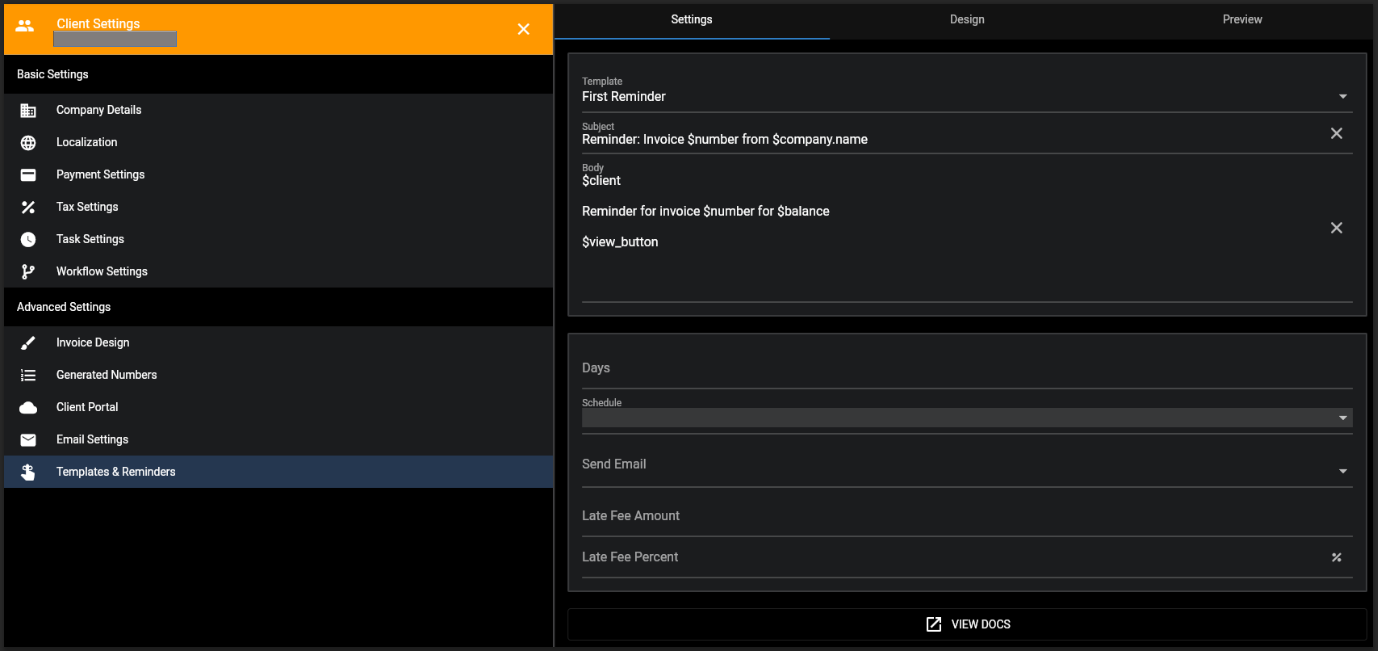
here my Client Specific Config for reminders
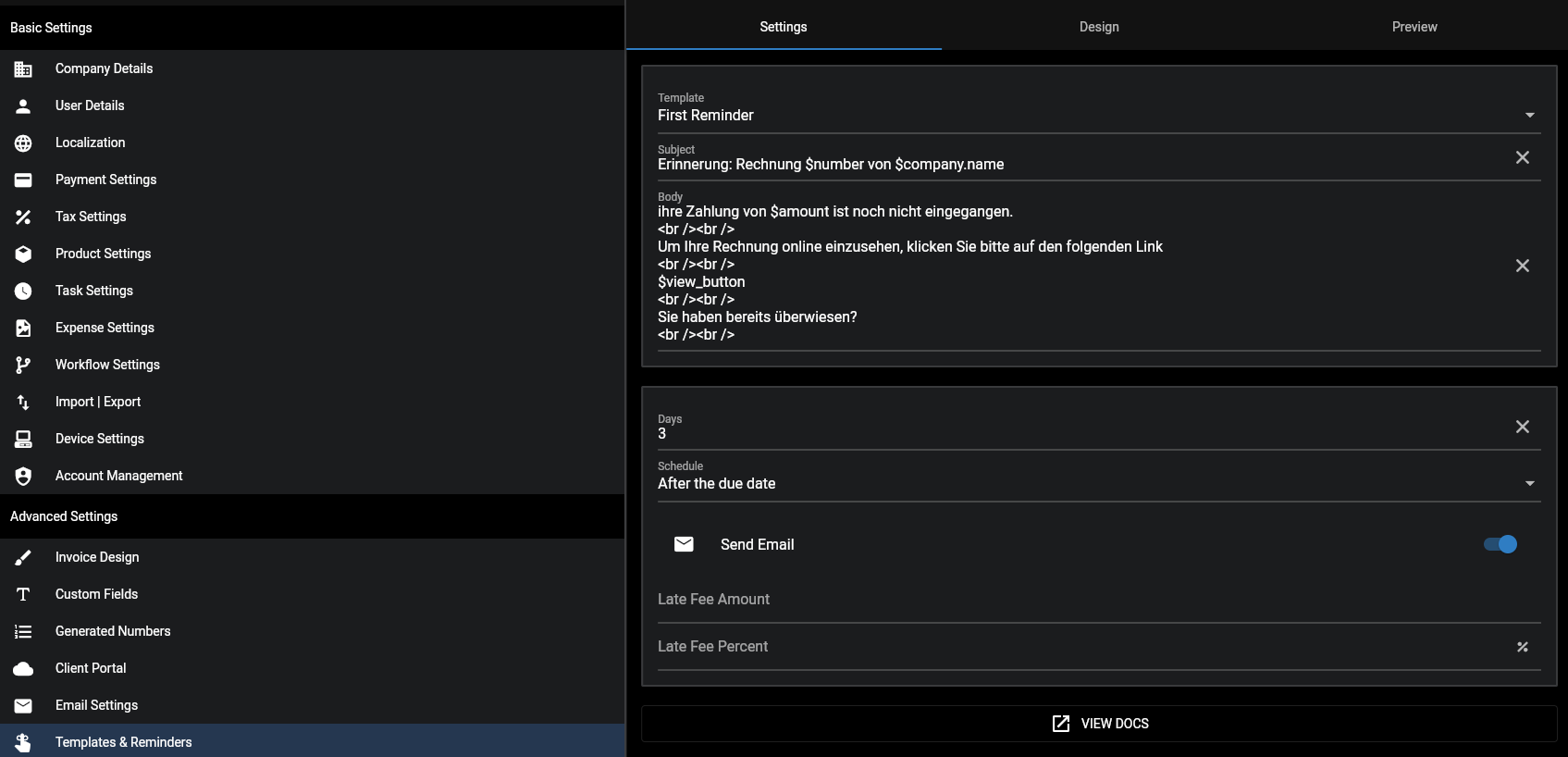
here my global config for reminders
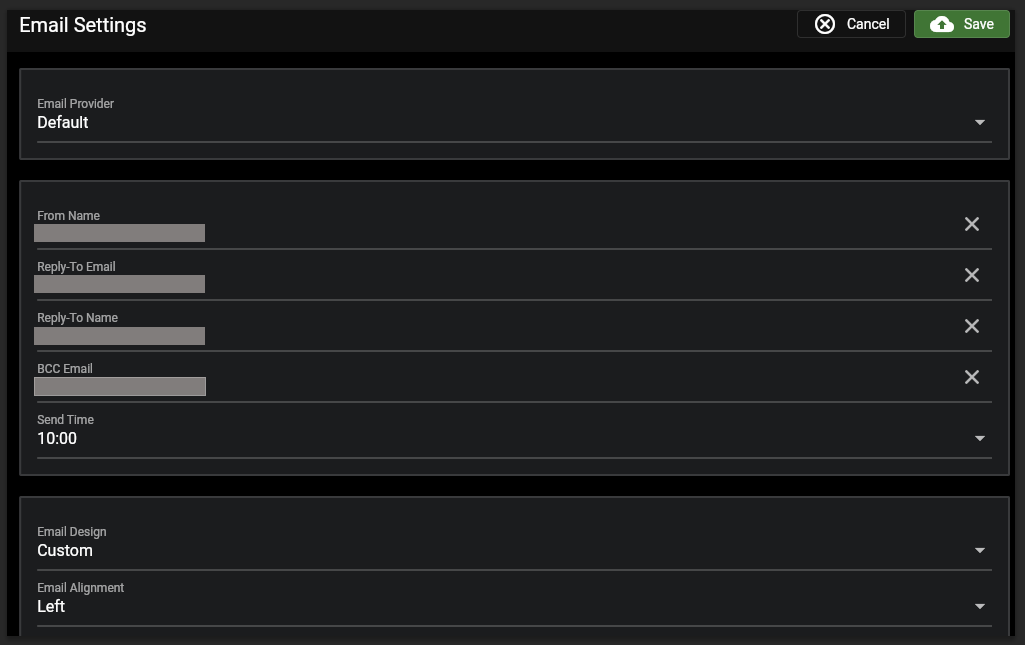
my E-Mail Settings
and my cron runs every 5 minutes
Let me know if you need more
sven.j
July 17, 2023, 7:15am
29
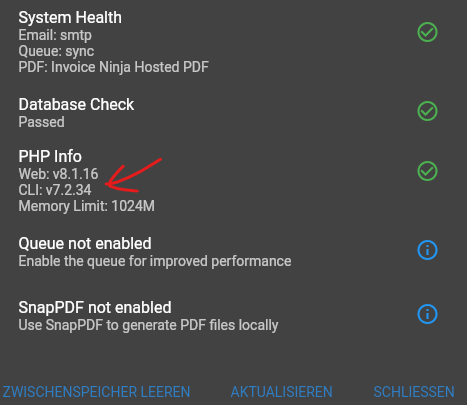
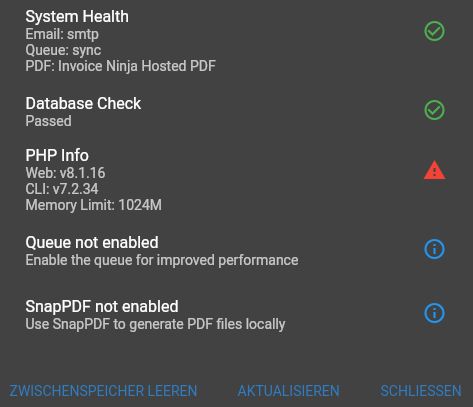
hi, could it be that the PHP Version missmatch is the reason?
PHP Version from SSH Terminal
PHP Version (CLI) from InvoiceNinja Systemcheck
hillel
July 17, 2023, 7:25am
30
That could very likely explain the problem.
@david can you please check that the health check is sending the correct value for is_okay in this case.
david
July 17, 2023, 8:53am
31
@hillel
I’ve had a look into this, we rely on exec() to harvest the cli version. The result does not parse to a value that can be compared reliably so I’d prefer not to alter the logic here as it will most likely break on different server setups.
1 Like
sven.j
July 18, 2023, 3:01pm
33
okay but how can i get my reminder Mails turn back to work
hillel
July 18, 2023, 3:44pm
34
Have you been able to change the CLI PHP version to v8?
sven.j
July 27, 2023, 7:57am
35
yes but just in the command line invoiceninja System Check show an older version
Command Line php -v
InvoiceNinja System Check
hillel
July 27, 2023, 8:00am
36
@david any ideas why the PHP version is different?
Note: we’ve recently fixed a reminder issue, it may explain your problem.
opened 12:56PM - 23 Jul 23 UTC
closed 07:38AM - 27 Jul 23 UTC
bug
fixed
I have checked the troubleshooting section and made sure that both the cronjob a… nd the queue worker is set up correctly and is working. In addition, my email setup is working, but for the reminder mails do not see any email dispatching, means no established connection for the particular invoiceninja email user I have.
Please note that I have changed invoice/quote/credit numbers in quoted and attached logs to some dummy ones.
## Setup
- Version: v5.6.19 (updated to v5.6.21 now, but according to the changelogs, no fix was addressing the issue I face)
According to _invoiceninja.log_, the **first missing reminder** has happened under version **5.6.18**.
The **last working reminder** was sent on 06/04/2023 using version **5.5.102**.
- Environment: Self hosted, own server
## Checklist
- Can you replicate the issue on our v5 demo site https://demo.invoiceninja.com or https://react.invoicing.co/demo?
I don't have a chance to replicate the issue there, as it needs an overdue invoice and a proper reminder setup. Means, it will take a few days to go through the whole process there.
- Have you searched existing issues?
Yes, nothing found about missing reminders which have stopped working out of a sudden
- Have you reported this to Slack/forum before posting?
No
- Have you inspected the logs in storage/logs/laravel.log for any errors?
Yes, see several log outputs below.
## Describe the bug
Once an invoice is overdue and the first reminder is about to be sent, I can see that the reminder job is running, but the same time, the following INFO message is logged in the _invoiceninja.log_:
```
[2023-07-22 03:00:03] production.INFO: Sending recurring invoices 2023-07-22 03:00:03
[2023-07-22 03:00:03] production.INFO: 2023-07-22 Sending Recurring Invoices. Count = 0
[2023-07-22 03:00:03] production.INFO: Recurring invoice send duration 2023-07-22 03:00:03 - 2023-07-22 03:00:03
[2023-07-22 03:00:03] production.INFO: Sending invoice reminders on 2023-07-22 03:00:03
[2023-07-22 03:00:03] production.INFO: caught a duplicate reminder for invoice 00005
```
As the reminder job is running every hour, the two reminder messages repeat accordingly:
```
[2023-07-22 04:00:03] production.INFO: Sending invoice reminders on 2023-07-22 04:00:03
[2023-07-22 04:00:03] production.INFO: caught a duplicate reminder for invoice 00005
```
22/07/2023 03:00 is kind of **NOT** the expected date/time where the reminder should be sent. Why "kind of"?
- The configured email send time is "3:00" (which matches the log output of the _invoiceninja.log_ above)
- The "next_send_date" database field of this particular invoice is '2023-07-22 02:00:00'. This must be UTC, as the last reminder (back in April) and recurring invoices that were sent are currently all sent at 04:00 local time (Germany, UTC+2).
So there is a mismatch between 3:00, identifying a "duplicate reminder" the first time vs. 4:00 as the expected dispatching time for the reminder.
In the database, for this particular invoice, the following fields were of interest for me:
- last_sent_date -> This field shows '2023-07-23' as today's date. Looks like it is getting updated with every reminder job run.
- next_send_date -> This field stays at '2023-07-22 02:00:00' and remains unchanged.
- reminder1_sent -> '2023-07-23' -> nope, no reminder email was dispatched today
- reminder_last_sent -> '2023-07-23' -> nope, no reminder email was dispatched today
The last _working_ reminder mail dispatching was looking like this in the _invoiceninja.log_ (06/04/2023):
```
[2023-04-06 02:00:02] production.INFO: Sending recurring invoices 2023-04-06 02:00:02
[2023-04-06 02:00:02] production.INFO: 2023-04-06 Sending Recurring Invoices. Count = 0
[2023-04-06 02:00:02] production.INFO: Recurring invoice send duration 2023-04-06 02:00:02 - 2023-04-06 02:00:02
[2023-04-06 02:00:02] production.INFO: Sending invoice reminders on 2023-04-06 02:00:02
[2023-04-06 02:00:02] production.INFO: reminder template = reminder1
[2023-04-06 02:00:02] production.INFO: Firing reminder email for invoice 00000 - reminder1
[2023-04-06 02:00:05] production.INFO: The IBAN field is required
[2023-04-06 02:00:06] production.INFO: The IBAN field is required
[2023-04-06 02:00:07] production.INFO: Trying to send to [email protected] 2023-04-06 02:00:07
[2023-04-06 02:00:07] production.INFO: Using mailer => smtp
[2023-04-06 02:00:08] production.INFO: The IBAN field is required
```
My reminder setup is:
- Invoice is sent at day 1
- After 14 days have passed, the invoice gets overdue
- 3 days after an invoice got overdue, the first reminder is sent
- The other two remaining reminders follow a few days later
My cron command is:
```
* * * * * userRedacted php /path/redacted/invoiceninja/artisan schedule:run >> /path/redacted/logs/cron-invoiceninja.log
```
My queue worker configuration is:
```
[program:invoiceninja-queue]
process_name=%(program_name)s_%(process_num)02d
command=php /path/redacted/invoiceninja/artisan queue:work --sleep=3 --tries=3 --max-time=3600
autostart=true
autorestart=true
stopasgroup=true
killasgroup=true
numprocs=2
redirect_stderr=true
stdout_logfile=/path/redacted/logs/supervisor-invoiceninja.log
stopwaitsecs=3600
```
I have attached both cron and supervisor logs, as well as the laravel.log and invoiceninja.log (EXPANDED_LOGGING is true).
Please note that the laravel.log shows SQL deadlocks, for which I will open a separate issue, as the logged times do not always match a sendout date, despite the deadlocked query has something to do with the "jobs" table.
### Steps To Reproduce
1. Set up a reminder process (first reminder is 3 days after overdue; "send email" turned on)
2. Set up an invoice and wait for it to get overdue + 3 days
3. See that no reminder email is sent and the reminder was identified as "duplicate"
### Expected Behavior
- The reminder emails are again sent at the "next_send_date".
- I cannot tell right now if the recurring invoice mail dispatching works or is affected by the same issue, too. The last scheduled recurring invoice was from 05/07/2023 and was sent successfully. I will perform a test over night and will update this issue tomorrow.
## Additional context
See above.
### Screenshots
<img src="https://github.com/invoiceninja/invoiceninja/assets/12110980/ed239ae4-d69e-4ca6-8780-ccec4c308a39" width="300" />
<img src="https://github.com/invoiceninja/invoiceninja/assets/12110980/3a62f6e3-8072-40f8-aa6c-9ff34de5a180" width="300" />
<img src="https://github.com/invoiceninja/invoiceninja/assets/12110980/8e61ba3e-46ca-4e66-8f66-00fc9b4c9b34" width="300" />
### Logs
See some quoted log messages above. For the full logs, please check out the attached files:
[laravel.log](https://github.com/invoiceninja/invoiceninja/files/12138772/laravel.log) (from 01/05/2023 on)
[invoiceninja.log](https://github.com/invoiceninja/invoiceninja/files/12138775/invoiceninja.log) (from 26/06/2023 on)
[cron-invoiceninja.log](https://github.com/invoiceninja/invoiceninja/files/12138773/cron-invoiceninja.log) (from 26/06/2023 on)
[supervisor-invoiceninja.log](https://github.com/invoiceninja/invoiceninja/files/12138774/supervisor-invoiceninja.log) (from 26/06/2023 on)
Kind regards,
Benjamin
sven.j
July 27, 2023, 8:08am
37
okay if ckeck the version via ssh with php it shows me the version 8.1.xx but if i check the Version with php script in the browser with exec it shows me the version 7.2.xx…
I think i open a ticket at me provider and ask him why?
sven.j
July 27, 2023, 8:16am
38
okay i wait for Version 5.6.23 i `ve currently running 5.6.22
david
July 27, 2023, 8:39am
39
@hillel
We just scrape whatever the CLI outputs for php -V
On shared hosting, it is always hit and miss, and i’m unsure of the accuracy of it in some scenarios.
1 Like
sven.j
July 27, 2023, 9:08am
40
yes i`ve tryed the same with php exec for php-v and the Version is 7.2.34 i wait for the naxt Version and hope it fixed this issue and i have opend a ticket at my provider for another solution to bring the PHP Version of the same level