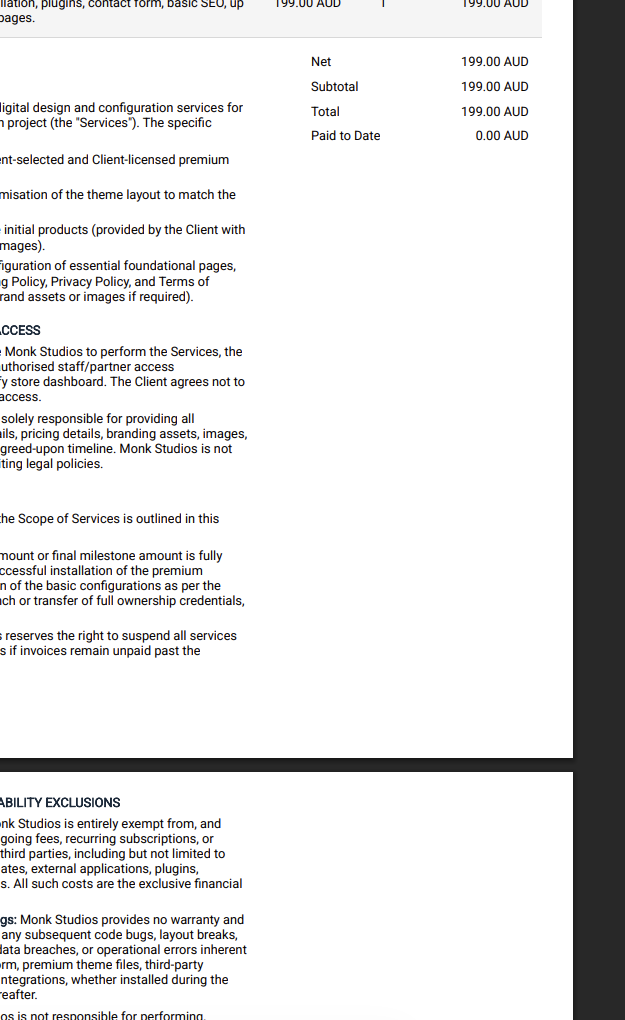
How to format the quote template / design to push the terms to the next page with 100% width - at the moment, it seems to start straight after the items listed and then carries on to the next page but with 70% width.
Hi,
Maybe this AI answer will help…
Here is the solution you can provide for this support request.
The issue occurs because the $terms variable in default Invoice Ninja v5 templates is nested inside the #table-totals grid. That specific grid is designed to split the page layout (keeping the financial totals aligned to the right), which traps the terms in a constrained column (usually around 70% width) and breaks standard pagination behavior.
To fix this, the $terms variable needs to be moved completely outside of the totals grid and given a CSS page break.
Step 1: Add the Page Break CSS
-
Navigate to Settings > Invoice Design > Custom Designs and edit the target design.
-
Open the Includes tab.
-
Add the following CSS to define a clean page break:
CSS
.page-break {
    page-break-before: always;
}
Step 2: Remove the terms from the totals grid
-
Switch over to the Body tab.
-
Locate the existing
$termscode. It is usually wrapped in a<p data-ref="totals_table-terms">tag and nested inside the<table id="table-totals">or<div id="table-totals">block. -
Delete that entire terms element from the totals section so it no longer renders in the constrained column.
Step 3: Re-add the terms at 100% width
-
Scroll to the very bottom of the Body tab, ensuring you are entirely outside of all other layout grids and tables.
-
Insert the terms wrapped in the new page-break class, applying a 100% width inline style:
HTML
<div class="page-break" style="width: 100%; padding-top: 2rem;">
    <p data-ref="totals_table-terms">$terms</p>
</div>
By pulling the variable out of the totals container, it is freed from the previous width constraints, and the page-break-before rule ensures the terms will always begin cleanly at the top of a brand new page.
I tried working with the help of AI before posting here but couldn’t find where the $terms is getting added from - it is not on my body or inclusions.
Figured out - had to add this to includes:
[data-ref="total_table-terms-label"] {
  page-break-before: always;   /* keep this one */
  display: block;
  font-size: 1.1em;
  font-weight: bold;
  margin-bottom: 10px;
}

[data-ref="total_table-terms"] {
  display: block;              /* no page-break-before here */
  width: 100%;
  box-sizing: border-box;
  padding-top: 10px;
}
1 Like
Glad to here it, thanks for sharing the solution!