New Docker install Invoice Ninja and Doubts

hi i am newbie to linux but have a bit knowledge.

My server runs virtualmin and have docker and some ports taken

i installed the invoice ninja from github opens up fine , but i dont see env file and all things they mentioned.

i bought license 30usd and added.

Possible for someone to guide me new installation self hosted with or without docker and reload the license? cause also i upload logo but it does not shows may be not embedded or something

at latest version please regards

Hi,

If you don’t have an .env file you can copy the .env.example file.

If the logo isn’t showing check APP_URL is correct in the .env file and then reupload the logo.

hi hillel thanks for head up.
so i just create via nano .env

also can u send me link for .env example?

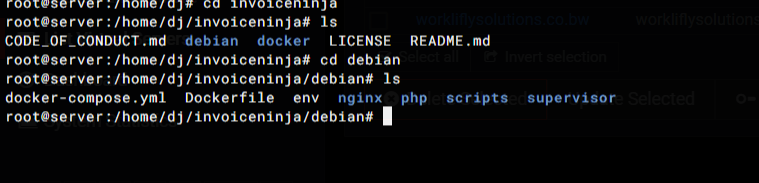
look at latest docker for ninja tree it looks strange unlike tutorials

Sorry, I didn’t notice you wrote you were using Docker. Have you seen this video? We recently changed to Debian but I believe it should be mostly the same.

hi hillel, i saw this video. but latest docker image does not have this kind of tree. as i shared pic above.

plus env example i cannot find.

please see above my tree in pic. and any latest installation video? wirh env and all

the env file is “.env” and so it is hidden.
you can list this with ls -a

An example of the .env-file is listed on github.
https://github.com/invoiceninja/invoiceninja/blob/v5-stable/.env.example

But the video listed above is great for installing.

1 Like

Thanks crunchy. Yes it was hidden found it.

I am accessing outside wan via http://publicip:8003
So changed app url to http://lanip:8003 in env

I can ccess the invoice ninja.

but logo is still unclear?

Or i am doing smthing wrong? I did docker ports to run image 80:8003

If you change the APP_URL you’ll need to re-upload the logo.

if your public IP never change could this work.
if hillels hint didn’t fix the logo problem, please show your docker-compose.yml in Code-Tags.

ENV Below:

IN application vars

APP_URL=http://workliflysolutions.co.bw:8003
APP_KEY=base64:RR++yno=
APP_ENV=production
APP_DEBUG=true
REQUIRE_HTTPS=false
PHANTOMJS_PDF_GENERATION=false
PDF_GENERATOR=snappdf
TRUSTED_PROXIES=‘*’

CACHE_DRIVER=redis
QUEUE_CONNECTION=redis
SESSION_DRIVER=redis

REDIS_HOST=redis
REDIS_PASSWORD=null
REDIS_PORT=6379

FILESYSTEM_DISK=debian_docker

DB connection

DB_HOST=mysql
DB_PORT=3306
DB_DATABASE=ninja
DB_USERNAME=ninja
DB_PASSWORD=ninja
DB_ROOT_PASSWORD=ninjaAassword
DB_CONNECTION=mysql

Create initial user

Default to these values if empty

IN_USER_EMAIL=xample.com
IN_PASSWORD=changeme!

IN_USER_EMAIL=

IN_PASSWORD=

Mail options

MAIL_MAILER=log
MAIL_HOST=
MAIL_PORT=2525
MAIL_USERNAME=null
MAIL_PASSWORD=null
MAIL_ENCRYPTION=null
MAIL_FROM_ADDRESS=‘[email protected]
MAIL_FROM_NAME=‘Self Hosted User’

MySQL

MYSQL_ROOT_PASSWORD=ninjaAdm1nPassword
MYSQL_USER=ninja
MYSQL_PASSWORD=ninja
MYSQL_DATABASE=ninja

GoCardless/Nordigen API key for banking integration

NORDIGEN_SECRET_ID=
NORDIGEN_SECRET_KEY=

IS_DOCKER=true
SCOUT_DRIVER=null
#SNAPPDF_CHROMIUM_PATH=/usr/bin/google-chrome-stable

Docker compose yml below :

x-logging: &default-logging
options:
max-size: “10m”
max-file: “3”
driver: json-file

services:
app:
build:
context: .
image: invoiceninja/invoiceninja-debian:${TAG:-latest}
restart: unless-stopped
env_file:
- ./.env
volumes:
- ./.env:/var/www/html/.env
# - ./php/php.ini:/usr/local/etc/php/conf.d/invoiceninja.ini:ro
# - ./php/php-fpm.conf:/usr/local/etc/php-fpm.d/invoiceninja.conf:ro
# - ./supervisor/supervisord.conf:/etc/supervisor/conf.d/supervisord.conf:ro
- app_public:/var/www/html/public
- app_storage:/var/www/html/storage
networks:
- app-network
depends_on:
mysql:
condition: service_healthy
redis:
condition: service_healthy
logging: *default-logging

nginx:
image: nginx:alpine
restart: unless-stopped
ports:
- “8003:80”
volumes:
- ./nginx:/etc/nginx/conf.d:ro
- app_public:/var/www/html/public:ro
- app_storage:/var/www/html/storage:ro
networks:
- app-network
depends_on:
- app
logging: *default-logging

mysql:
image: mysql:8
restart: unless-stopped
env_file:
- ./.env
environment:
MYSQL_DATABASE: ${DB_DATABASE}
MYSQL_USER: ${DB_USERNAME}
MYSQL_PASSWORD: ${DB_PASSWORD}
MYSQL_ROOT_PASSWORD: ${DB_ROOT_PASSWORD}
volumes:
- mysql_data:/var/lib/mysql
networks:
- app-network
healthcheck:
test: [ “CMD”, “mysqladmin”, “ping”, “-h”, “localhost”, “-u${MYSQL_USER}”, “-p${MYSQL_PASSWORD}” ]
interval: 10s
timeout: 5s
retries: 5
logging: *default-logging

redis:
image: redis:alpine
restart: unless-stopped
volumes:
- redis_data:/data
networks:
- app-network
healthcheck:
test: [ “CMD”, “redis-cli”, “ping” ]
interval: 10s
timeout: 5s
retries: 5
logging: *default-logging

networks:
app-network:
driver: bridge

volumes:
app_public:
driver: local
app_storage:
driver: local
mysql_data:
driver: local
redis_data:
driver: local
in my case i have removed the read-only parameter (:ro) at the end of the volume-mounts for app_public and app_storage in the nginx-section.

in my opinion when using the web-interface to upload any files, the nginx app must write these files in app_public storage.

but i didn’t use docker volumes for app_public. i have mounted a local folder wich have the rights 755 www-data www-data

i think i might need to remove container and do from scratch.

But what about license i put? can i put it on new docker i create?

yeah your license should be fine, its tied to your account not the container. so if you spin up a fresh docker install you can just re-enter the license key and it’ll activate again.

for a clean start id suggest following the official docker-compose setup on github - grab the latest docker-compose.yml and the .env.example, rename it to .env, fill in your details (APP_URL, db creds etc) and docker compose up -d. make sure APP_URL matches exactly how you access it from your browser, thats what fixes the logo issue most of the time.

also one thing that tripped me up before - if you mount volumes for public/storage, make sure the permissions are right (www-data needs write access). like Chrunchy mentioned removing the :ro flag helps, or just set 755 with www-data ownership on the host folder.

if youre still having logo trouble after all that, try clearing browser cache too, sometimes old assets get stuck there.

fwiw if you find the whole docker + reverse proxy + ssl setup too annoying, theres a project called Syncloud that packages invoice ninja with one-click install and handles all the https/update stuff automatically. full disclosure i work on it so im biased, but it might save you some headaches since youre new to linux. either way the docker route works great once you get past the initial config.