Version ie <v5.10.30>
v5.13.26
Environment <Docker/Shared Hosting/Zip/Other>
ZIP
Checklist
- Can you replicate the issue on our v5 demo site https://demo.invoiceninja.com or Invoice Ninja?
- Have you searched existing issues?
- Have you inspected the logs in storage/logs/laravel.log for any errors?
Describe the bug
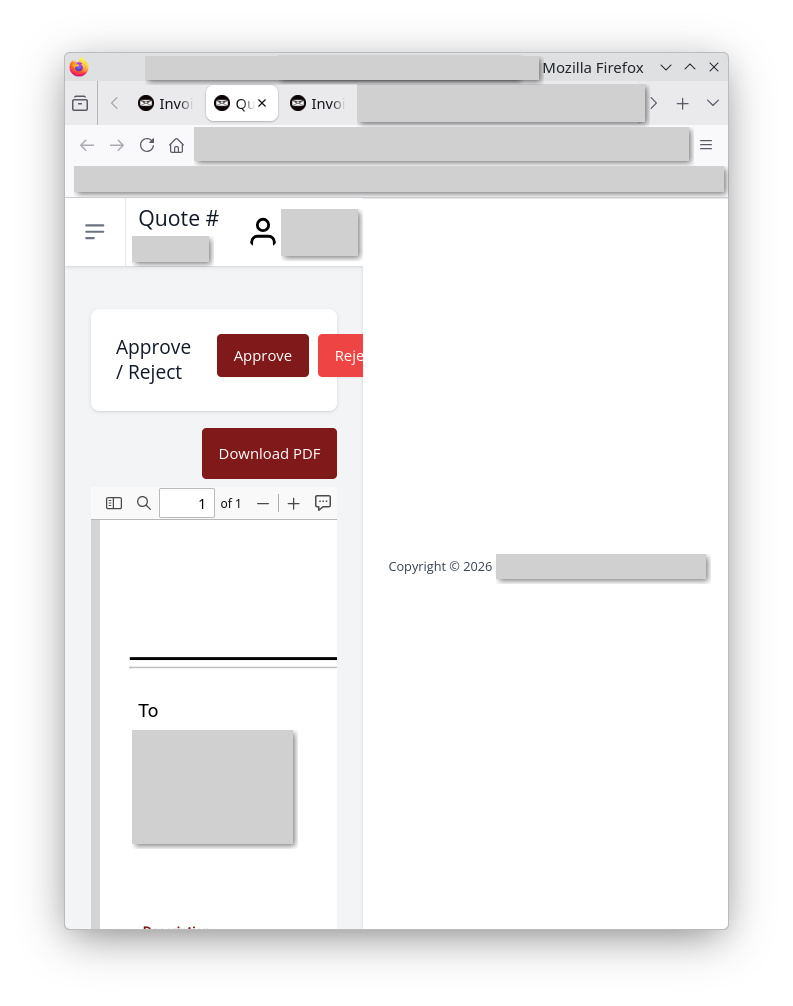
When “Display HTML Version When Viewing On Mobile” under the client portal settings is turned OFF and a client is viewing a specific quote on mobile, the webpage footer (copyright and company name) appears from the right (not the bottom) and takes over the screen. This rendering the page unusable. This can be recreated on the demo site. Invoices do not appear to be effected.
Steps To Reproduce
- Under Settings, Client Portal, Setting Tab, turn off “Display HTML Version When Viewing On Mobile”
- Create a fake Quote, Save it, Click on “View in Portal” so that you a seeing the actual quote (not the list of quotes)
- Observe on the Client Portal the Footer appearing from the Right Side (not the bottom)
- View on mobile or resize desktop window to see how it renders the webpage useless
Expected Behavior
The Footer of Client Portal when view a specific quote should remain on the bottom when “Display HTML Version When Viewing On Mobile” is set to OFF.