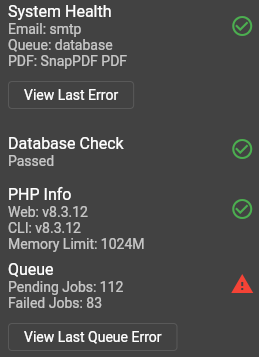
Moved from 5.12.13 to .17 and invoices are broken, possibly more. I can view data but if I create a new invoice it gives a non-descriptive server error. Refreshing shows they are there but can’t interact with them. I read some older posts about fixing these errors but its borked no matter what I do. I could clear the pending jobs but the failed jobs stayed the same. Reverted back to the previous snapshot for now.
I changed from database to sync and get the following under system health.
[2025-08-17 18:30:36] production.ERROR: Connection refused [tcp://127.0.0.1:6379] {“userId”:1,“exception”:"[object] (Predis\Connection\ConnectionException(code: 111): Connection refused [tcp://127.0.0.1:6379] at /usr/share/nginx/invoiceninja/vendor/predis/predis/src/Connection/AbstractConnection.php:144)
I get the following when creating an invoice on the desktop app.
500: Internal Server Error * Server Error
php artisan queue:clear drops the pending jobs to 0 but still shows failed jobs. Same errors using either interface.
Wrong host in Docker (127.0.0.1 problem)
Inside a container, 127.0.0.1 = the app container, not the host or the Redis container. Use the service name (usually redis) instead of 127.0.0.1.
Port/firewall
Redis default is 6379. If you changed it or have a firewall, you’ll see “Connection refused”.
Auth mismatch
If Redis requires a password but .env has REDIS_PASSWORD=null, auth will fail (usually a different error, but worth checking).
Redis crashed / OOM
Look for “OOM”, “RDB/AOF error”, or “Loading” in Redis logs.
What to check / do (fast path)
A) If you’re using Docker (official Invoice Ninja stack or your own)
php artisan horizon:terminate   # Horizon will restart with new config
# or Supervisor:
supervisorctl reread && supervisorctl update && supervisorctl restart all
B) If you’re on a bare-metal / VM install (no Docker)
Ensure Redis is running:
sudo systemctl enable --now redis
redis-cli ping
.env host should be 127.0.0.1 (or your server IP) only if the app and Redis are on the same machine:
REDIS_HOST=127.0.0.1
REDIS_PORT=6379
REDIS_PASSWORD=null
REDIS_CLIENT=phpredis   # if the PHP extension is installed; otherwise use 'predis'
Clear Laravel caches (same commands as above) and restart your PHP-FPM/Nginx if needed.
Temporary mitigation (to get the app stable)
If Redis is optional in your setup (no Horizon), switch to file/database while you fix Redis:
CACHE_DRIVER=file
SESSION_DRIVER=file
QUEUE_CONNECTION=database   # or 'sync' if you must
The stack trace shows Predis\Connection… Connection refused [tcp://127.0.0.1:6379]. In Docker, that host is wrong—use the service name. Outside Docker, it means Redis isn’t listening/running.
If you paste your .env Redis lines and confirm whether you’re running Docker or not, I can tailor the exact changes.
It’s working now that I installed redis. Can confirm that it wasn’t there before so I dunno what happened to it even though I already had the lines in the .env file. I did add REDIS_CLIENT=predis though. .13 did work without it so maybe I never had it installed? Can’t seem to find it in the installation guides.
Not sure if this is a worry but ‘php artisan queue:clear’ gets rid of pending jobs but it still shows a warning about failed jobs.
I wanted to add my experience to this thread as I’ve just spent the better part of a day troubleshooting the exact same issue after updating to v5.12.17.
My Environment:
OS: Ubuntu 22.04
Control Panel: cPanel & WHM
Web Server: LiteSpeed
Previous State: Working perfectly on a version from several months ago (v5.12.x). I’ve been self-hosting Invoice Ninja since 2021 and have never needed Redis before; it has never been installed on my server at any point, so this is not a lingering issue from my environment. It’s possible the breaking change was introduced before v5.12.17, but this is the version where it impacted my update.
The Problem: Immediately after the update, I started getting a 500 Internal Server Error when performing any action that triggers a background job (like starting/stopping a task). The laravel.log file was filled with Connection refused [tcp://127.0.0.1:6379] errors, indicating the application was trying to connect to Redis, even though my .env was explicitly set to use the database queue.
Troubleshooting Steps (What Didn’t Work): Like others, I went through an exhaustive process to rule out environmental issues:
Clean Install: Performed a completely fresh install of v5.12.17, only copying over my .env and storage directory. The error persisted.
Cache Clearing: Ran php artisan optimize:clear multiple times.
Server Reboot: Performed a full server reboot to clear any server-level caches like OPcache.
Configuration Hunt: Verified that there were no server-level environment variables overriding my .env file in WHM, cPanel, .htaccess , or the web server’s virtual host configuration. The server was clean, as far as I know from my search for any issues.
.env Changes: Added SCOUT_DRIVER=null and SCOUT_QUEUE=false to my .env file as suggested. This did not resolve the issue.
No matter what I did, the application on v5.12.17 was determined to use Redis for its queue.
The Solution (Workaround): Confirming what the other user found, the only way to resolve the 500 error was to give the application what it wanted:
Installed Redis Server on Ubuntu 22.
Installed the ea-php84-php-redis extension and enabled it. It’s worth noting that this was a significant chore, as the extension was not available in my WHM EasyApache 4 repositories and had to be compiled from source manually. This new dependency can be a major pain point for self-hosters on similar setups.
Changed my .env file to QUEUE_CONNECTION=redis .
After clearing the cache and restarting the web server, the application now works perfectly.
Conclusion: This seems to be a clear breaking change. The application now appears to have a hard dependency on Redis for its queuing system, regardless of the settings in the .env file. For users on environments like Ubuntu + cPanel who don’t have Redis installed by default, this will break their installation upon updating.
Hopefully, this information helps the developers track down the issue. For anyone else experiencing this, installing Redis is the current workaround.