same with mine

Can you ping the server IP address?
Here is the ping to pdf.invoicing.co from my hosting server.
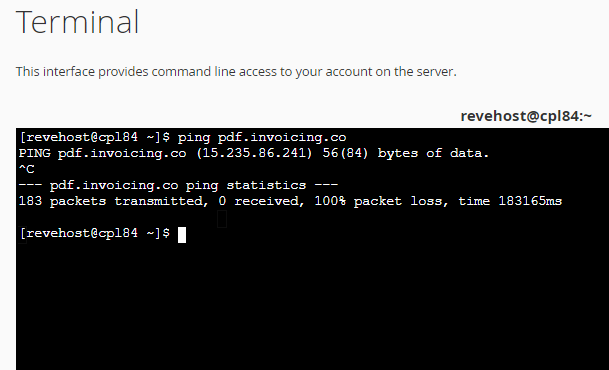
got the same result as @showaib
I think something on that server are blocking our IP. Maybe something like firewall? maybe it treats the pdf request as suspicious?
We have made a routing change for pdf.invoicing.co and it should be controlled by cloudflare now.
when the dns updates, please advise if the issue persists.
You may also want to escalate with your host to advise loss of network connectivity to this IP for them to investigate.
1 Like
Its working now!!
It seems the IP address of the pdf.invoicing.co subdomain changed.
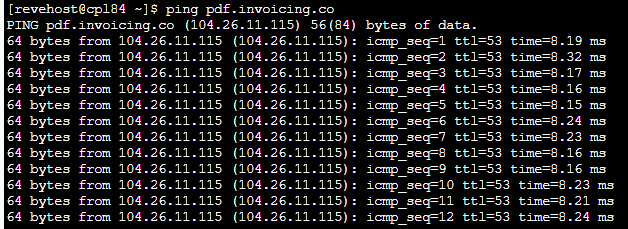
Thanks for advising. I would be very interested to understand what you host advises in regards to lack of connectivity to this IP address.
Using the looking glass, i do not see any issues reaching your IP from our servers.
1 Like
Working for me now also, thanks for sorting
yay! mine also. couldnt sleep last night because of this.
ran into this recently.
Fix Blank PDFs in Invoice Ninja (Debian 13)
Problem
PDF download returns blank page or 500 error.
Cause
proc_opendisabled inphp.ini- Snappdf can’t find Chromium
Fix
1. Enable proc_open
Edit /etc/php/8.4/fpm/php.ini. Find disable_functions = exec,passthru,shell_exec,system,proc_open,popen. Remove proc_open. Result: disable_functions = exec,passthru,shell_exec,system,popen. Then sudo systemctl restart php8.4-fpm.
**2. Install Chromium Headless sudo apt update && sudo apt install -y chromium-headless-shell`
3. Set path in .env``
Add SNAPPDF_CHROMIUM_PATH=/usr/bin/chromium-headless-shell to /var/www/invoice-ninja/.env
4. Clear cache
cd /var/www/invoice-ninja && sudo -u www-data php artisan config:clear
5. Restart Apache
sudo systemctl reload apache2